Databricks Asset Bundles (DAB): Declarative Deployment for Production Workloads
Asset Bundles are how production workloads ship on Databricks in 2026. A YAML manifest, the Databricks CLI, environment-aware overrides, and an audit trail in Git. They replace the era of UI-clicked jobs and brittle Terraform modules. This guide is the practitioner-level overview: when to use bundles, how they sit alongside Terraform, the structure that scales, and the CI/CD shape they enable.
Every Databricks team eventually hits the wall: a job was created in the UI, edited by three people, never reviewed, and now nobody can answer "what changed last Tuesday?" The wall has had several proposed solutions, Terraform, the REST API, hand-rolled scripts, and one that has consistently held up: Databricks Asset Bundles. They are the platform's purpose-built deployment format, and in 2026 they are how serious teams ship.
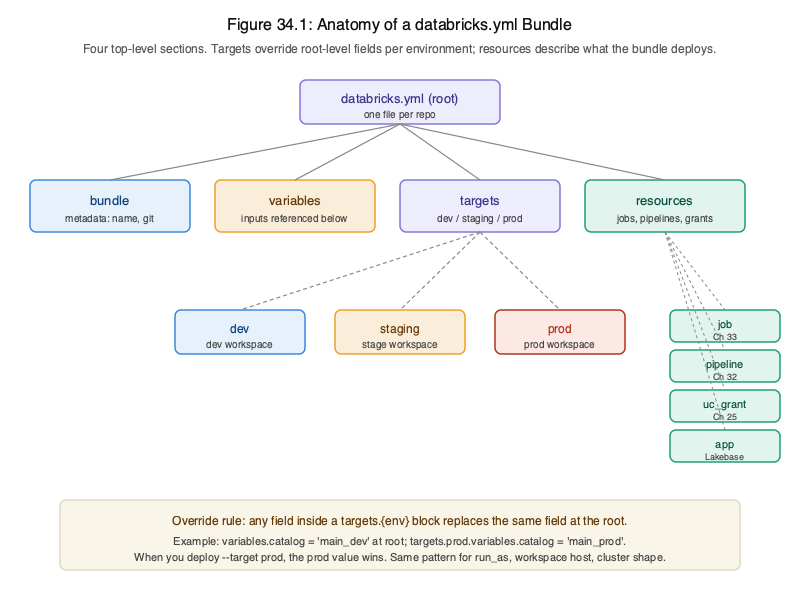
What a bundle actually is
A directory with a databricks.yml manifest and any code or notebooks it deploys. The
manifest declares resources (jobs, pipelines, models, endpoints, dashboards) and
targets (environments, dev, staging, prod). Variables and overrides parameterize
per-environment values. The databricks bundle CLI validates, plans, and deploys the
bundle against a target.
bundle:
  name: retail-platform

variables:
  catalog:
    default: dev_retail

resources:
  jobs:
    bronze_ingest:
      name: ${var.catalog}__bronze-ingest
      tasks:
        - task_key: ingest
          notebook_task:
            notebook_path: ./src/bronze_ingest.py

targets:
  prod:
    variables:
      catalog: prod_retail
    run_as:
      service_principal_name: sp-retail-prod
That snippet is the entire shape: one bundle, one job, three environments, one service principal per environment. You expand from there, more jobs, SDP pipelines, MLflow models, and the model holds.
DAB vs Terraform: when to reach for which
The honest answer: both, for different layers. Terraform is right for platform infrastructure that rarely changes, workspaces themselves, account-level UC catalogs, network configuration, IAM federation. DAB is right for the workloads that change with every sprint, jobs, pipelines, models, endpoints. Most production estates use both: a small Terraform repo per platform, a DAB-based repo per team.
DAB exists because Terraform's resource model doesn't naturally fit notebook-and-job-shaped work. Updating a notebook shouldn't require a `terraform apply`. Promoting a job from staging to prod shouldn't require state imports. Bundles handle this naturally.
Multi-environment promotion: the pattern that actually works
The bundle is the single source of truth; targets are the variation points. A typical promotion flow:
- Engineer pushes a branch with bundle changes.
- CI runs
databricks bundle validateon the PR. - Merge to main triggers
databricks bundle deploy -t dev. - Manual approval gates
deploy -t staging. - Tests pass → deploy -t prod, run as the prod SP.
Same bundle, same artifacts, different target. The only thing that varies between staging and prod is the variables and the SP, which is exactly what you want.
What goes in the bundle, what stays out
Bundle: jobs, SDP pipelines, model serving endpoints, MLflow experiments, registered model aliases,
notebooks (as .py with cell markers), Python wheels, dashboards.
Not bundle: UC catalogs/schemas/grants (those belong in Terraform or the platform team's setup), secrets (those live in secret scopes, referenced by name), business data (obviously).
The CLI and the iteration loop
The local development loop is fast:
databricks bundle validate, syntax + schema + reference check.databricks bundle deploy -t dev, push to the dev target.databricks bundle run job_name -t dev, trigger a single job.databricks bundle destroy -t dev, clean teardown of everything the bundle created.
The teardown command is underrated. Being able to spin up an entire deployment, run an experiment, and tear it down cleanly is the difference between a confident change and a lingering test.
What's in Volume 3 on this
Chapter 34 is the full DAB chapter: bundle anatomy, the CLI and SDK, variable and override patterns, multi-target promotion, and a worked example that takes the retail-analytics pipeline from a developer notebook to a versioned, SP-executed prod workload. Chapter 35 follows up with the CI/CD wrapper in GitHub Actions, using OIDC federation so no long-lived secrets ever land in the CI environment.