Lakeflow Jobs on Databricks: Orchestration, Event-Driven Triggers, and Production Patterns
Lakeflow Jobs is the Databricks-native orchestrator: dependency graphs, schedules, event triggers, retries, parameters, conditional branches, all driven from the same UC identity model as the rest of the platform. It's where most production work on Databricks gets scheduled in 2026, and the patterns it rewards are different from a generic Airflow DAG.
Orchestration is the part of every data platform that gets reinvented three times before anyone writes it down. On Databricks in 2026, the answer has settled: Lakeflow Jobs (the rename of Databricks Workflows) is the default. Tasks chain by dependency. Triggers fire on schedules, file arrivals, Delta table updates, or webhooks. Retries, conditional branches, and parameter overrides are built in. Service principals own production execution.
The task taxonomy
A Lakeflow Job is a graph of tasks. The task types that matter most: Notebook for Python or SQL development that's also debuggable interactively, SDP Pipeline for the Lakeflow Spark Declarative Pipelines you described in SDP, SQL Query / Alert / Dashboard for analytics layer refreshes, dbt for dbt-databricks projects, Python wheel / JAR for packaged code, and Run Job for cross-job composition. There are more, the point is you almost never need to leave the platform to assemble a real pipeline.
Event triggers: the move away from cron
The big shift since 2024 is the move from time-based to data-based triggering. Most pipelines now fire on:
- File arrival in a UC volume, bytes land, the job runs, no schedule.
- Table update on a Delta table, the upstream SDP pipeline finishes, downstream consumers wake up.
- Lakeflow Connect sync completion, the Salesforce sync finished, run the dependent transforms.
- Webhook, external system signals readiness.
The operational consequence: end-to-end latency drops from "however long until the next 2am cron" to "however long the upstream took plus the trigger." Costs also drop because nothing runs that didn't have data to process.
Retries, conditionals, and what to actually configure
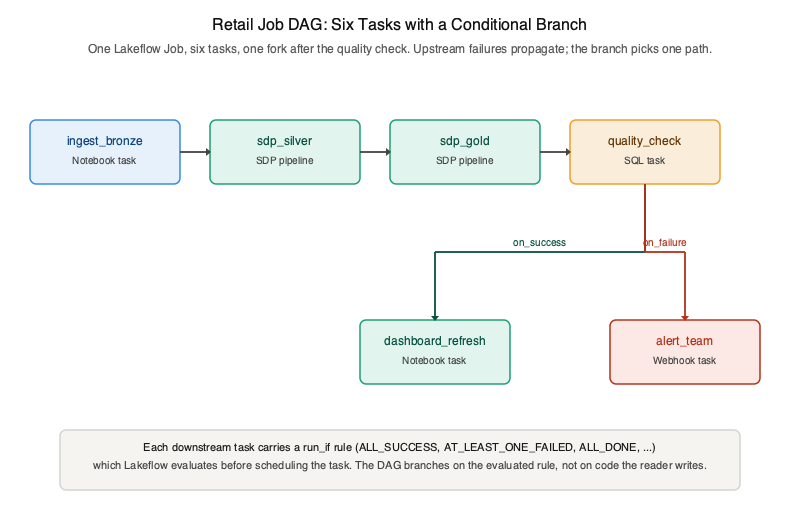
Per-task retry policy: count, delay, retryable error classes. The right default is 3 retries with exponential backoff for most idempotent tasks, 0 retries for tasks that aren't idempotent (don't re-send the customer email three times). Conditional tasks gate on upstream status, run a notification task if all upstream tasks succeeded, run a cleanup task if any failed. The pattern that replaces ad-hoc try/except blocks.
Parameters: one job, many runs
Job-level parameters with per-task references. The single most common use case is
environment promotion: the same job definition runs against dev_retail,
staging_retail, prod_retail with a single catalog
parameter override. Combined with Asset Bundles, this is how you stop maintaining one job per
environment.
Service principals are non-negotiable in production
Personal access tokens belong in development. Production jobs run as service principals with the
exact UC privileges they need and OAuth credentials in UC connections for anything external.
The benefit is not just security, it's auditability. When system.access shows that
a table was read at 03:47 UTC, you want the principal to be sp-retail-bronze-prod,
not alex@example.com who left the team last quarter.
The shape of a mature jobs estate
Past ~100 jobs, conventions stop being optional. The patterns that consistently work:
- Naming:
env__domain__purpose,prod__retail__bronze-ingest. - One SP per job (or per small group), narrow UC grants.
- Job definitions live in Asset Bundles, not the UI.
- Lakeflow Connect or file-arrival triggers wherever a cron was reflexive.
- Alerts route to PagerDuty/Slack via the built-in notification channels, not a custom on_failure handler.
What's in Volume 3 on this
Chapter 33 covers Lakeflow Jobs end-to-end: task graph construction, the full trigger taxonomy including the file-arrival and table-update triggers, parameter and conditional patterns, SP setup, and the operational view (run history, alerts, lineage). Combined with Asset Bundles (Ch 34) and CI/CD (Ch 35), that's the full picture of how a job goes from a developer's notebook to a versioned, reviewed, SP-executed production workload.