Unity Catalog: The Practitioner's Guide to Governance, ABAC, Lineage, and Volumes (2026)
Unity Catalog stopped being optional in 2024 and became the platform contract in 2026. Every production workload, tables, models, features, dashboards, agents, AI SQL, terminates in UC for grants, lineage, and audit. This is the practitioner-level guide: the object model, the three privilege flavors (SQL grants, ABAC, governed tags), the migration path from HMS, and the patterns that keep UC manageable past a thousand objects.
Most teams adopting Databricks in 2026 hit the same wall: the platform's surface area is enormous, the runtime is good, the orchestration is good, the AI features look magical, and then six months in, nobody knows who can read what, lineage is a slack thread, and three teams disagree about whether a column is PII. Unity Catalog is the layer that resolves all three problems at once. If you treat it as a checkbox, it gets in your way. If you treat it as the contract every team writes against, it scales.
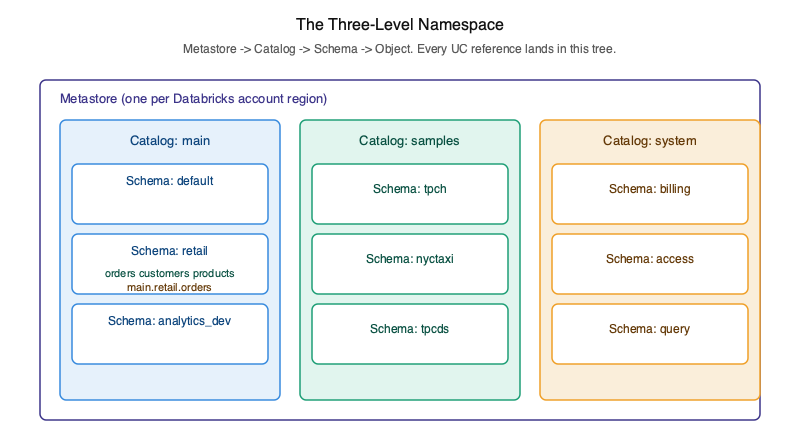
The three-level namespace, and why it matters
Every UC object lives at catalog.schema.object. The third level, the catalog, is the
one that changes how teams operate. A catalog is the boundary across which you stop expecting code
to "just work" and start designing for explicit federation. Most mature estates use catalogs to
separate environment (dev/staging/prod), domain (finance/retail/ops),
or both, prod_retail.bronze.orders is unambiguous in a way that orders never
is. Workspace-catalog bindings then control which catalogs each workspace can see, so you don't
accidentally read production data from a development notebook.
The first hands-on in a new workspace is always the same: create a catalog, create a schema, create a managed table, upload a file to a volume, read it back. Once you've done that, every other UC feature is a refinement of those primitives.
Managed vs external tables: the only decision rule you need
Managed tables store data in UC-controlled storage. Databricks owns the layout, runs predictive optimization, handles vacuum and compaction. External tables point at a path you registered through an External Location + Storage Credential. Both are governed identically, the difference is who owns the bytes.
Default to managed. The only reasons to choose external in 2026 are: another engine outside Databricks needs to read the same files in place, regulatory rules force you to keep data in a specific bucket lifecycle, or you have a cross-account sharing setup that Delta Sharing doesn't cover. Otherwise managed wins on every operational axis, better optimization, less to monitor, fewer permission seams.
Access control: grants, ABAC, and governed tags
UC offers three layered ways to grant access. SQL grants (GRANT SELECT ON TABLE foo TO `group`)
are the floor, explicit, per-object, easy to audit but painful at scale. ABAC sits on top:
you write a policy that says "any table tagged sensitivity:public is readable by everyone in
the workspace," and you stop maintaining grants per table. Governed tags (GA March 2026) give you the
admin-defined vocabulary that makes ABAC trustworthy, anyone can write a string tag, but only
admins can mint a governed tag, so the policy surface stops drifting.
The pattern that holds up: SQL grants for one-off exceptions, governed-tag-driven ABAC for the rule, row filters and column masks for the cases where neither grants nor tag policies are precise enough. You'll catch a few teams trying to use grants everywhere; talk them off the ledge before the grant count crosses ten thousand.
Volumes: the AI primitive nobody talks about enough
Volumes are governed unstructured file storage. They look unglamorous next to AI SQL functions and
agent frameworks, but they're the substrate every Agent Bricks and
RAG system in your workspace will eventually depend on.
PDFs that ai_parse_document reads. Model artifacts. Ingest staging for files that haven't
landed in a table yet. Treat volumes as a first-class object, name them, tag them, grant on them, and
your AI pipelines inherit the governance for free.
Lineage and audit: what changes when both are queryable
Column-level lineage in UC isn't a UI feature, it's a system-tables feature. Every read, every grant,
every job run lands in system.access and system.compute. The first time you
write a SQL query that answers "who has read this PII column in the last 30 days?", and gets a
correct answer in seconds, UC stops feeling like overhead. The compliance reviews that used to take
weeks of slack triangulation become a saved query.
The HMS → UC migration, briefly
There's no good shortcut. The path that works: stand up UC in a new catalog, dual-write the high-traffic tables for a sprint, cut readers over, then cut writers over. The tooling (`SYNC SCHEMA`, the UC upgrade wizard) handles the easy 80%. The remaining 20%, code that hardcoded the workspace metastore, jobs running as personal users, ACL diagrams nobody updated, is where every team loses two weeks. Volume 3 includes the full runbook.
What's in Volume 3 on this
Five chapters cover Unity Catalog end-to-end: the object model and volumes (Ch 25), access control with ABAC and governed tags (Ch 26), identity and secrets (Ch 27), managed tables with Delta + Iceberg UniForm (Ch 28), and observability via system tables plus the HMS migration runbook (Ch 30). Each chapter is built around a worked example on the same retail-analytics dataset that threads through the whole series, so by the end you've governed it end-to-end.