Databricks Feature Store: The Practitioner's Guide
The feature store is the part of an ML platform that prevents your model from quietly breaking three months after launch. On Databricks in 2026, it's deeply integrated into Unity Catalog and the broader Lakehouse, with online serving from Lakebase. This guide covers what it solves, how to use it, and when it pays off.
The feature store is the most underrated piece of any production ML platform. Engineers tend to discover its value by reverse engineering an outage: the model started misbehaving, the team spent two weeks investigating, and the root cause turned out to be a subtle change in how a feature was computed in inference versus training. The feature store exists to make that class of bug impossible.
On Databricks in 2026, the feature store has been absorbed into Unity Catalog as "Feature Engineering in Unity Catalog", but the concept and the API are unchanged. Same primitives, same discipline, better governance.
Feature tables as a first-class concept
A feature table is a Delta table with three things:
- An entity key, the identifier the feature applies to (user, product, transaction).
- A timestamp column for time-aware features (point-in-time correctness).
- One or more feature columns, the actual values.
What makes it a "feature table" rather than just a Delta table is the metadata Databricks attaches: feature definitions, lineage, ACLs, registration with the feature engineering API. Models that consume the table do so by reference; if the definition changes, downstream lineage tracks it.
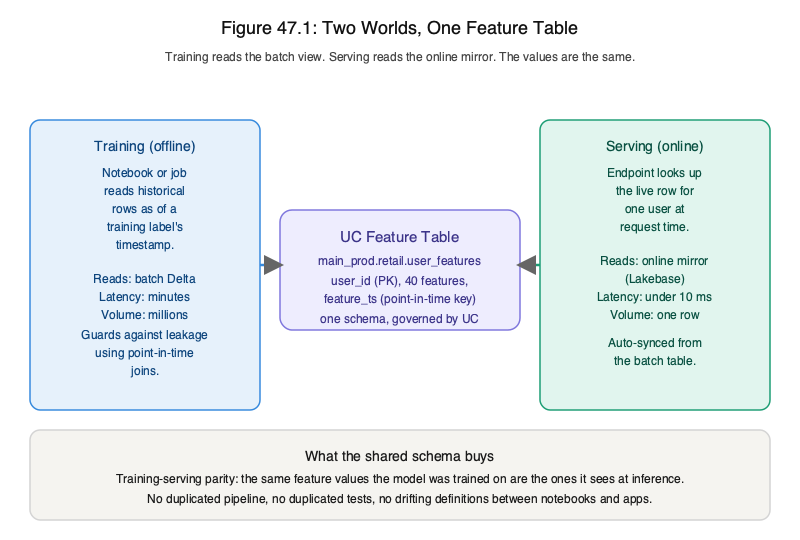
The training-serving skew problem, in detail
Imagine a recommendation model. At training time, "user's average purchase amount over the last 30 days" is computed by aggregating purchase records and joining to the user. At serving time, that same feature is computed by a different system, a real-time stream, a feature pipeline, an application backend.
Even subtle differences in those two computations, how nulls are handled, whether the 30-day window includes the current day, which timezone the aggregation lives in, cause the model to see different feature distributions in training versus production. The model degrades. The team blames model drift. The actual cause is feature drift, which is almost always pipeline drift.
The feature store fixes this by being the single source for feature values, used by both training and serving. The same query produces the same values.
Offline and online serving
Two access modes:
- Offline lookup, point-in-time joins for training. Given a set of entities and timestamps, return the feature values as they would have been at those timestamps.
- Online lookup, low-latency reads by entity key. Used at inference. Backed by Databricks Online Tables in 2026.
Online Tables are auto-synced from the offline feature table. A change in the offline table propagates to the online table within seconds. The model serving endpoint reads from the online table; sub-10ms latency at moderate scale.
Point-in-time correctness
The non-obvious requirement for offline lookups: features must be reconstructed as they were at the training timestamp, not as they are today. A user's "last 30 days of purchases" looks different now than it did a year ago.
The feature store handles this through the timestamp column and the offline join API. You pass a training dataframe with entity keys and timestamps; the API returns features as of each timestamp. Skipping this gives you a model that's overfit to information it wouldn't have at inference time, leakage, in the worst case.
Lineage as a debugging tool
The feature engineering API records lineage automatically: which feature pipeline produced which feature table; which models consumed which features; which inference workloads used which models. Unity Catalog surfaces this graph.
The practical value: when a feature table needs to change, you can answer "what breaks" in seconds. When a model misbehaves, you can answer "what features could be the cause" before starting to investigate.
When the feature store is overkill
It's possible to over-invest. Two cases where a feature store adds more complexity than it removes:
- One-off batch models, a model that runs once a week against a fixed snapshot. There's no training-serving boundary because there's no serving.
- Pure LLM applications with no structured features, if your "features" are just retrieved documents passed to an LLM, you're already using Vector Search, not a feature store.
Most other production ML systems benefit from a feature store. The cost of not having one shows up later.
What the book covers
The feature store chapter in Databricks for Practitioners walks through:
- Designing feature tables with proper entity keys and timestamps.
- Setting up online tables and validating freshness.
- Point-in-time training data assembly.
- Integrating with the MLflow Model Registry for end-to-end lineage.
- Patterns for sharing features across teams without coupling deployments.
- The migration story from ad-hoc feature pipelines to a managed feature store.